
A pantry tracker that stays current.
Last checked
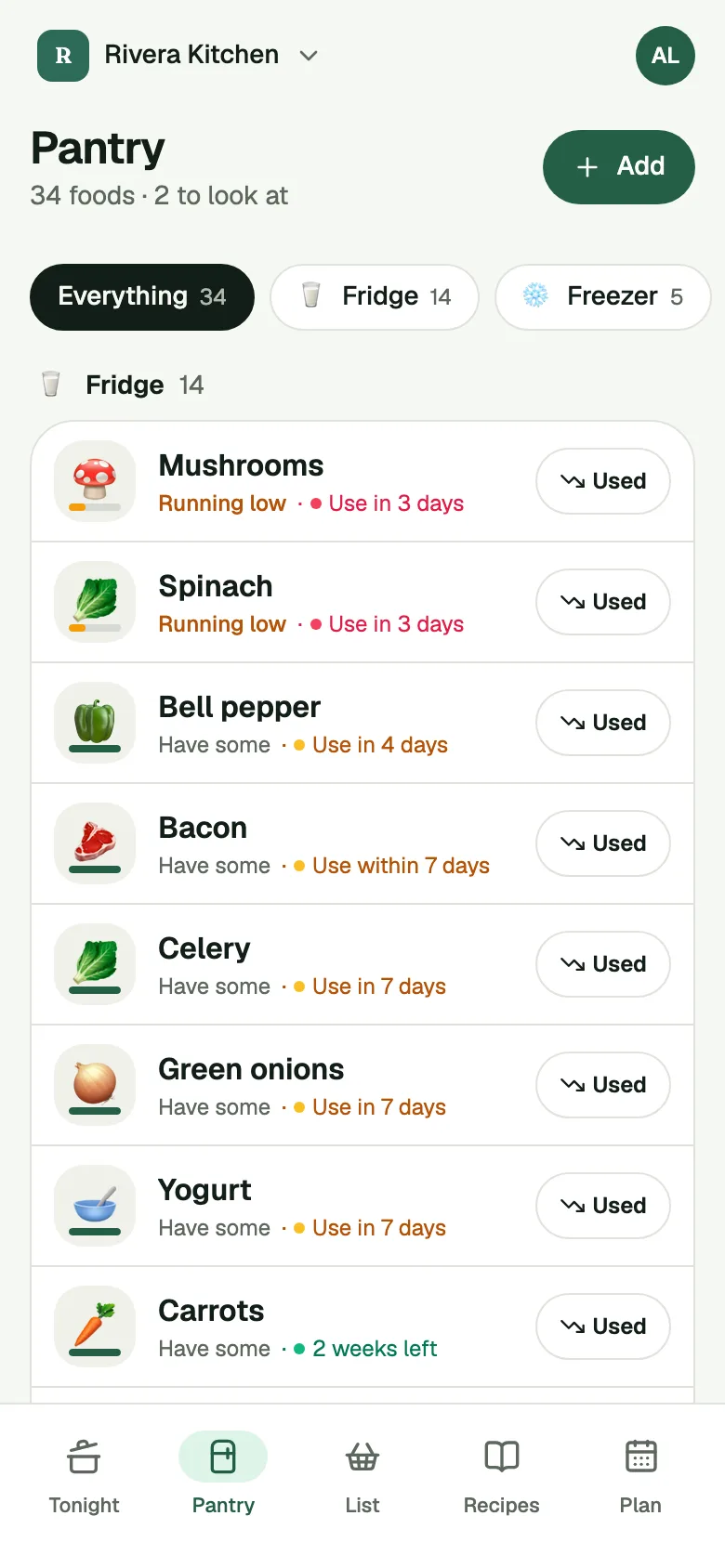
Pantry Assistant keeps a list of the food in your kitchen. Each food is marked have, low or out, and sits in the fridge, the freezer or the pantry. You tap once a day to keep it right, and dinner is picked from what you really have.
Get an invite
How it works
- Tell it what you have. At setup, open the Fridge, the Freezer and the Pantry and tap the foods you see. Setup takes a couple of minutes. Start with a few things and add more as you go.
- Tap once a day. The daily Check-in asks a few quick questions, like "Still have milk?". Each answer is already set to the app's best guess, so most days one tap confirms them.
- Let dinner and shopping update it. Tell the app you made a planned dinner and it takes what the recipe used off your pantry. After a shop, Put Away moves what you bought into the pantry.
Have, low or out. Every food shows how much is left. Tap Used as you use it up: the first tap makes it Running low, the next makes it All gone. Foods you count, like eggs or cans, work by number instead.
Fridge, freezer and pantry. The Pantry screen has a tab for each place, plus Everything. You can add your own, like a garage freezer. Each food shows how long it keeps in the place it sits, and moving it to the freezer gives it a new, longer date. See the freezer list.
Dates, with "about". You never have to type a date. When the app doesn't know one, it estimates it from USDA storage guidance, on the cautious side. A date marked "about" is an estimate. Open the food and the app says where it came from: our estimate, the package, or you. A date from the package or from you replaces the estimate. See Pantry dates.
Use first. At the top of the Pantry, a row lists foods whose date is within 3 days or past, so you cook them before they turn.
What it does not do
Dates are estimates. The app tells you when a food is near its date or past it, and it can't see or smell the food. Check food yourself before you eat it.
The first setup takes a pass. You tap what you have once, and that is the work. After that the daily Check-in does the upkeep.
There is no barcode scanner. To add food you can tap it in the setup grid, type what you got, scan a receipt or scan a shelf. Scans are part of Plus, and the free app gets a few each month.
It won't know about food you eat and don't tell it about. A food stays on the list until the Check-in, a dinner or you take it off.
Common questions
Does it work offline?
Yes. Your phone keeps a copy of the kitchen's pantry, so you can read it and make changes with no signal. Changes sync when you're back online.
Can the family share one?
Yes. A kitchen is shared by everyone you invite, on their own phones and on the web. Owners and Editors change the pantry and answer the Check-in. Once anyone answers a question, it's gone for everyone.
What happens when something runs out?
It's marked Out, and it comes up in your next Check-in under "You're out of these". Nothing goes on the shopping list unless you tap Add to the list.
Where do I start?
Get the app, name your kitchen and tap what you have. The Check-in takes it from there.