
Turn a receipt into a pantry update.
Last checked
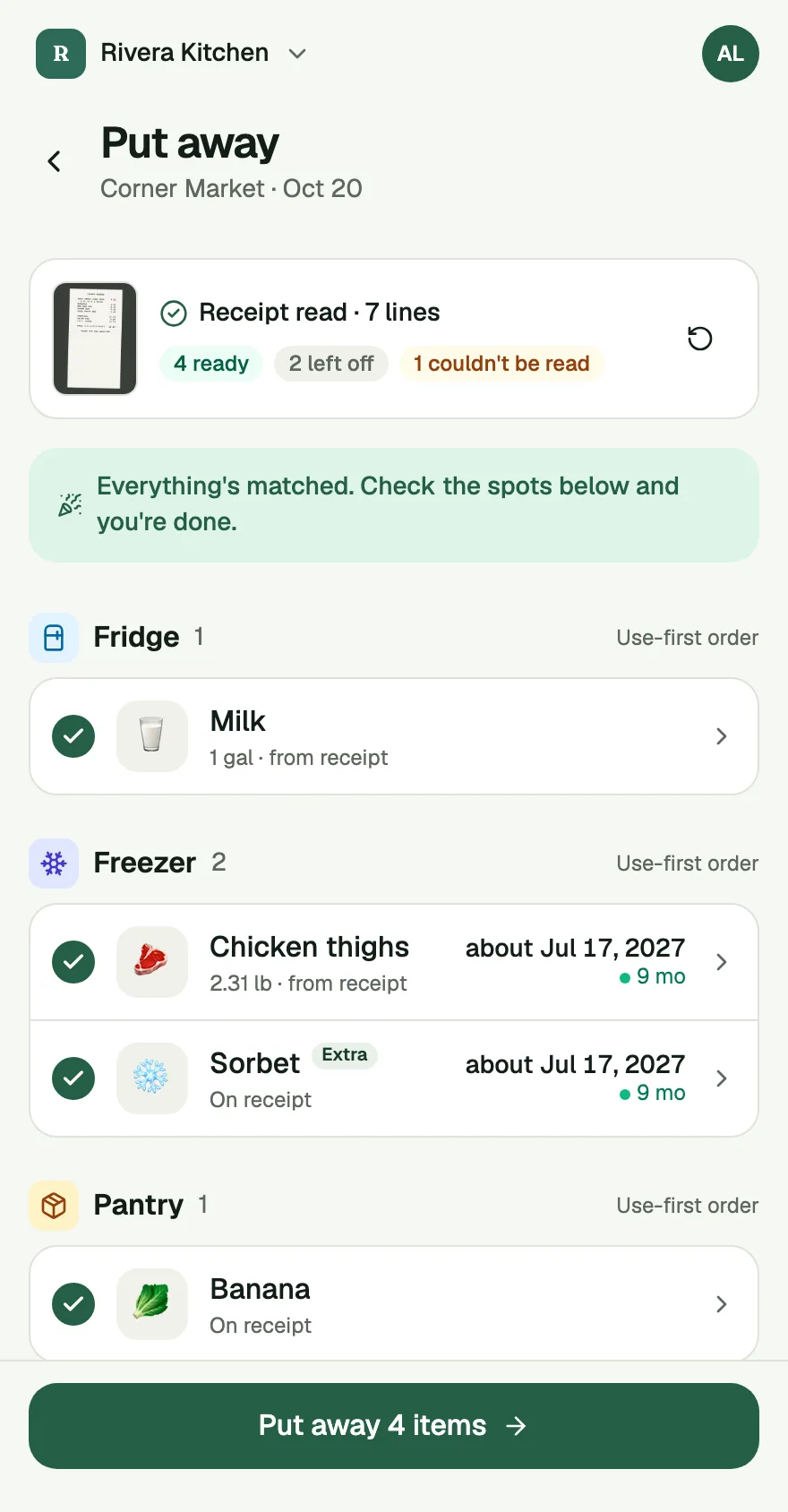
Back from the store with a bag of food and no energy to type it in? Take a photo of your receipt. The app reads it and fills in your Put Away, and asks about anything it is not sure of. You tap Put away.
Receipt Scan is part of Plus. Free kitchens get 3 scans a month.
Get an invite
How it works
- The photo. After you tap Done shopping on your list, scan the receipt. Lay it flat, fit the whole thing in the frame and wait a few seconds. The app reads the receipt and matches what it can to the food on your list. Lines it can't match or read are left for you to sort.
- The quick check. Lines the app wasn't sure about wait in a short list. Each one takes one tap: Yes, Something else or Not food. If the app has no guess, the buttons are Pick a food and Not food.
- Put it away. Tap Put away and the food goes into your pantry. The amounts, the receipt's date and the store come from the receipt and fill the Put Away for you. Nothing in your pantry changes before you tap.
Two more places help you catch things:
- Did you get...? asks about items on your list that aren't on the receipt, so you notice what was left at the store.
- Left off holds lines that aren't food, like a bag fee or tax. If the app got one wrong, tap It's food.
Food you bought but never put on the list shows up with an Extra badge, so your pantry matches what's really in the bags. A line too smudged to read asks you to add what it was, or skip it.
What it does not do
Receipt Scan uses AI, and AI can be wrong. It can match a line to the wrong food, or misread a price. That's why the lines it isn't sure about wait for your tap, and why nothing reaches your pantry until you put it away. Look over the matches before you tap.
It reads a receipt, not your mind. If it can't read your photo, the app says "Couldn't read that receipt" and "A quick retake usually does it." You can also use your list and put things away by hand.
It's not a rewards app. It doesn't pay you for scanning. It exists for one job: a pantry that matches your last shop without the typing.
The first time, the app asks before it uses AI. It sends the photo and food lists, never your account name or email. A photo goes as taken, so anything printed in it, like a name on a receipt, a label or a letter, goes too. Keep those out of the shot or cover them. If you say no, scanning stays off for you only, and you can change it any time in Settings.
Common questions
Does it read every receipt?
Show it the whole itemized receipt, with the store name and total, laid flat and in good light. A line too smudged to read is marked, and you add what it was or skip it. If the app says "Couldn't read that receipt", a quick retake usually does it.
Does it change my pantry on its own?
No. Nothing reaches your pantry until you tap Put away. Lines you didn't check are skipped, and the app tells you which.
Is Receipt Scan free?
Receipt Scan is part of Plus. Free kitchens get 3 scans a month, receipts and shelves together. Plus has no monthly limit, up to 10 scans a day. See Pricing for what each plan includes.
Does it use AI?
Yes. The first time, the app asks "Use AI for this?" before anything is sent. You can turn it off for yourself in Settings and keep using Put Away by hand.