
Keep the recipes you cook.
Last checked
Your recipes are in browser tabs, screenshots and a card from someone's mother. Put them in one place your whole kitchen can use. Paste a link, write your own, or start with 71 Starter Recipes. Then cook from the app, one step at a time.
Get an invite
How it works
- Paste a link or use the share sheet. Owners and Editors can add recipes; Viewers have no Add button. Open Recipes, tap Add, paste the recipe's web address under From a website and tap Import recipe. On iPhone, iPad and Android you can also share a link straight from your browser to Pantry Assistant, and the import starts. On iPhone, iPad and Android the app pulls in the photo too. It reads the ingredients and steps, and matches the ingredients to your pantry.
- Make it yours. Tap Write my own to type a recipe: a name, how many it serves, the time, the ingredients one per line, and the steps. Paste a whole ingredient list and the app splits it into lines. Every recipe belongs to your kitchen, so everyone in it sees it.
- Cook it. Tap Cook mode for one step at a time, and Read aloud to hear each step while your hands are busy. Tap a time in a step to start a timer. When you're done, tap I made this and the app takes the ingredients off your pantry. You can undo it.
The Starter Recipes. New kitchens come with 71 Starter Recipes, so Tonight has dinner ideas from day one. They show under Starter recipes on the Recipes tab. Try one, then tap Save to our recipes to make it yours to change. Spot a mistake? Use Report a problem.
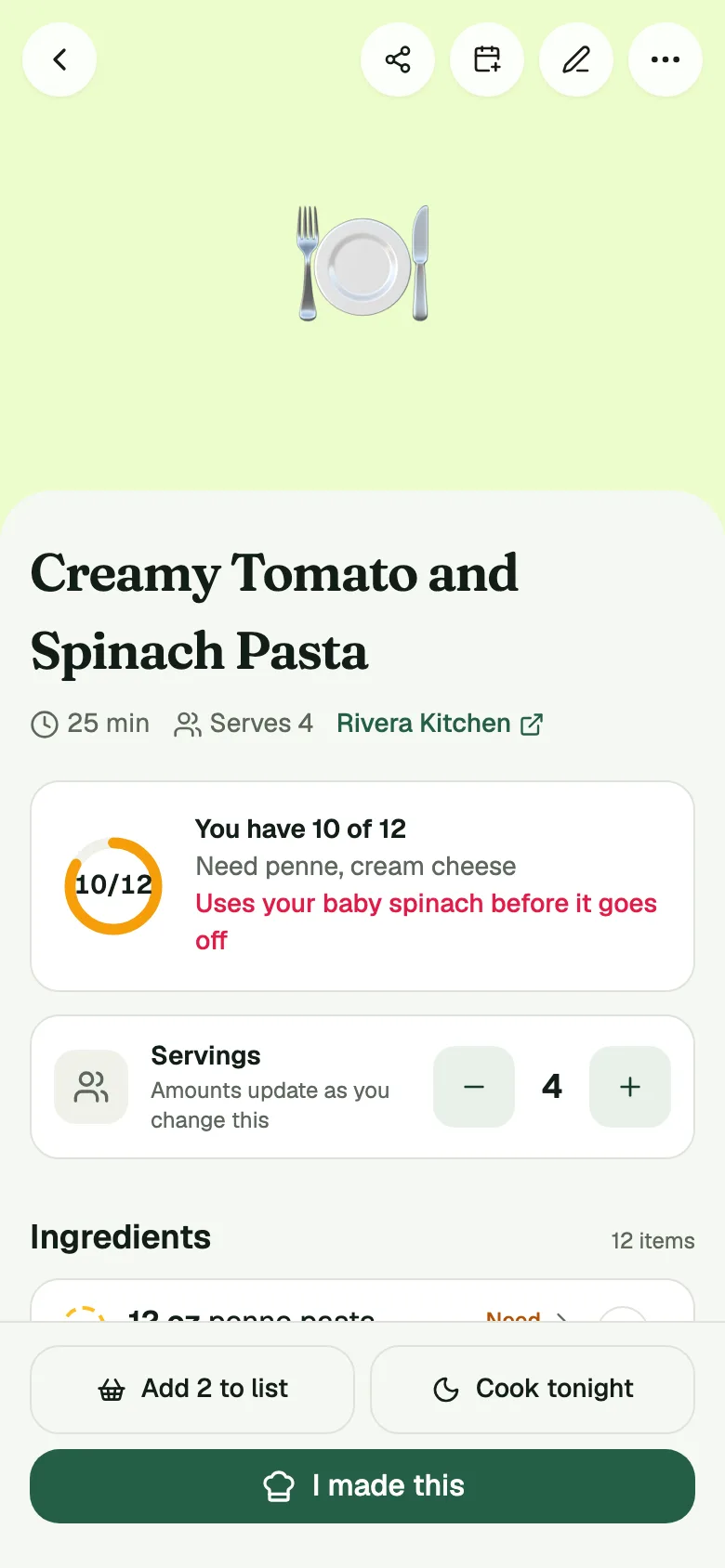
What you have. Each ingredient says whether you have it, need it, or always have it. Tap + beside one you need to put it on your shopping list.
Share a recipe. Open a recipe and tap Share. You can send a link to a clean recipe page that anyone can open, with no app and no sign-in. You can share a tall picture of the recipe, or print a recipe card. A friend who has the app can save it to their kitchen from the page. Starter Recipes can't be shared until you save them as your own.
What it does not do
Link import does not read every site. We measure it. On October 17, 2026 we ran the import over 101 popular recipe pages. It produced a usable recipe, with a name, at least one ingredient and at least one step, from 92 of them (91.1%). Of the pages we could fetch, it read 92 of 93. The rest were sites that refuse automated readers, plus one page our reader couldn't parse. A different list of sites, or a site that changes, will give a different number.
When a page can't be read, the app says why. Some pages hide the recipe behind a video or a login, and a few sites block apps. It keeps the link and guesses the name, and you can tap Write it myself and add the rest.
It's a place to cook from, not a recipe store. Starter Recipes are a starting set, not every dish you'll want.
Common questions
Which sites can I import from?
Most popular recipe sites. In our October 17, 2026 test, 92 of 101 popular recipe pages imported cleanly. Sites that block automated readers can fail, and the app tells you when one does.
How do I save a recipe from my phone's browser?
Use the share sheet. On iPhone, iPad and Android, share the page to Pantry Assistant and it opens Recipes and starts the import. In a web browser, paste the link under From a website.
What are the Starter Recipes?
A set of 71 recipes that every new kitchen gets, so Tonight has ideas from day one. Save one to your recipes to change it. They are used for dinner picks, and those picks stay free.
Can I send a recipe to someone who doesn't have the app?
Yes. Tap Share on a recipe for a link to a clean recipe page anyone can open, or share a picture or a printable card.