
Tonight's dinner without the thinking.
Last checked
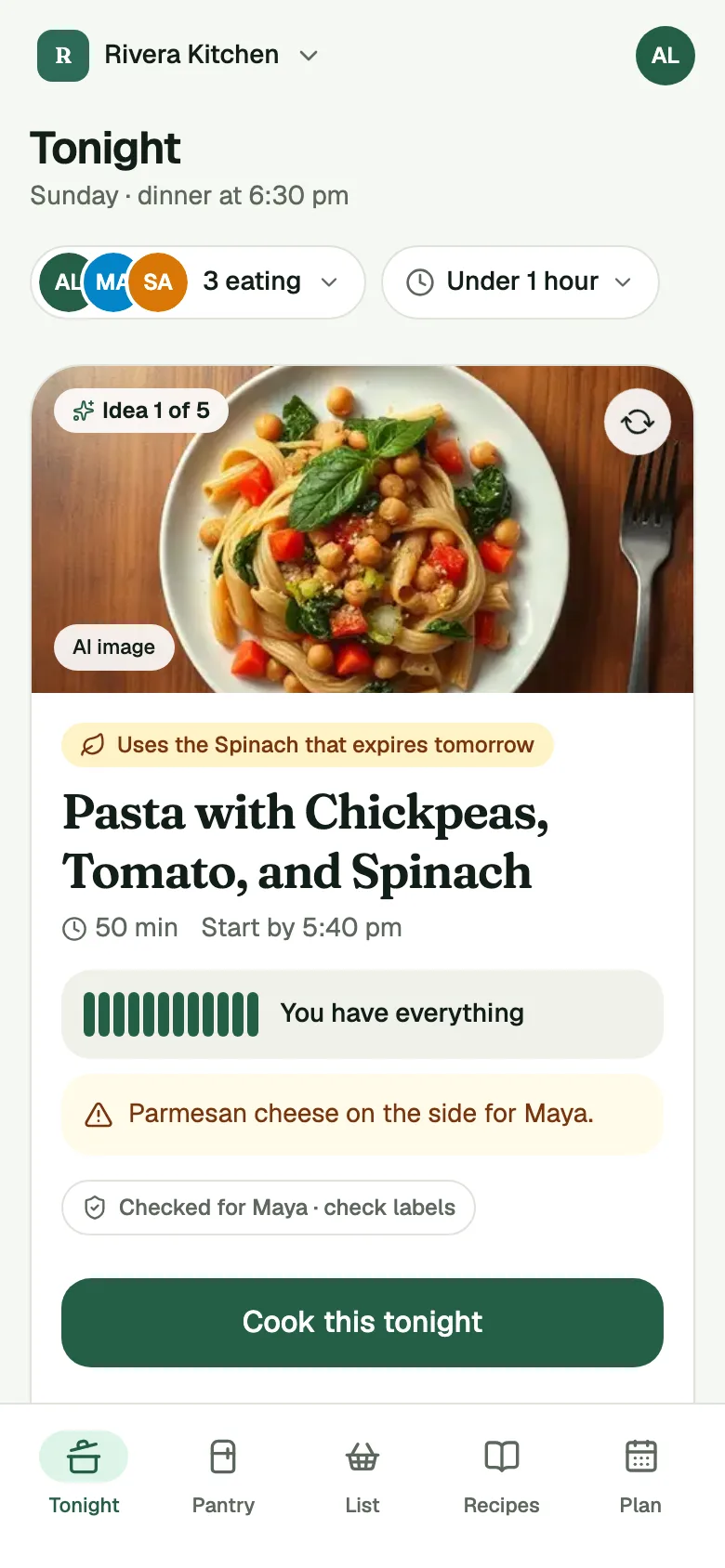
It's 5 pm. You're tired, and you don't know what's in the fridge. Open Pantry Assistant and one dinner is already waiting, picked from what's in your pantry. The card tells you why it was picked, how long it takes and when to start.
Picks from your own recipes and the Starter Recipes stay free.
Get an invite
How it works
- Reload, and the reason. Open Tonight. The card says why this dinner, like "Uses the spinach that expires tomorrow". It shows the time it takes and whether you have everything or are short one thing, with a link to add that one thing to your list.
- Keep it or ask for another. Tap Cook this tonight or swipe right to plan it. Not feeling it? Tap the arrow on the card or swipe left for the next idea. Not this tells the app why, so later ideas get better.
- Plan the week when you want to. You never have to plan ahead. When you'd like to, the Plan tab holds the week, and Fill My Week walks you through every open night.
The week plan. Plan shows this week, one row per night, and how many nights are open. Pick a dinner for a night, or mark it Eating out, Leftovers, Takeout or Pizza night, and that night asks nothing of you.
Fill My Week. Tap Fill and the app offers one idea at a time for today and the next six days, open nights only. Keep it, or swipe for the next idea. At the end you see your whole week and tap Plan to save it. Nothing goes on your shopping list until you add it.
Diners per day. Each night shows who's eating: everyone, or just some people. Change it for any night. Amounts and the shopping list follow who's home. Away for a few days? Say so, and those dinners scale down.
Everyone at your table. A kitchen plans around someone's allergies only once they turn on Share my food needs, which is off until they do, and you still check labels. Each card says whose allergies it checked: "Checked for Alex · check labels". The app checks the ingredients it knows about. It can miss things, so always check labels.
What it does not do
It picks from your own recipes and the Starter Recipes, and only those. It doesn't write new recipes, and it doesn't search the web for dinner ideas. If your kitchen has few recipes, you'll see the Starter Recipes more often. Add your own and they come first.
It can only work with what it knows. The Pantry stays current through the daily Check-in and Put Away, and the more current it is, the better the pick. A pick that needs one thing says so.
It doesn't promise a dinner is right for anyone. The allergy check is a planning help, not a guarantee, so always check labels.
Common questions
How does the app pick tonight's dinner?
It looks at what's in your pantry, what needs using up soon, how long you have, and who's eating tonight. It picks from your own recipes first, then the Starter Recipes, and it tells you the reason on the card.
Do I have to plan the week?
No. Tonight always has a dinner idea. Planning the week is there when you want it, with Fill My Week to do it in a few swipes.
Do dinner picks cost anything?
Picks from your own recipes and the Starter Recipes stay free. Plus removes the monthly scan limit on receipt and shelf scans. See Pricing.
Does it plan dinners around food needs?
Yes, once each person turns on Share my food needs in that kitchen. It's off until they do. Then dinners with an allergy food for someone eating tonight are left out, and each card says whose allergies it checked, so always check labels.