
Know what is in your freezer.
Last checked
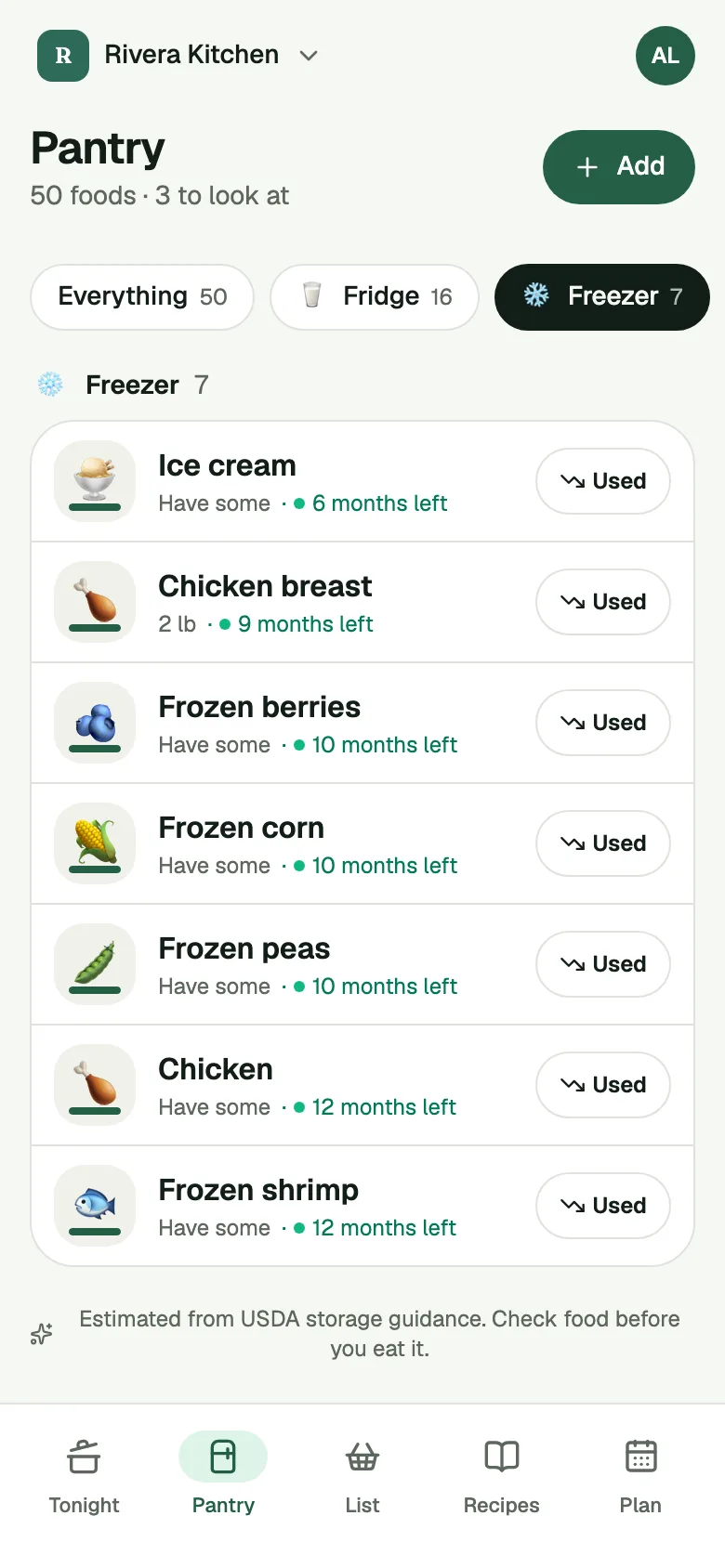
Pantry Assistant gives your freezer its own list. Each food is there with its amount and an estimated date, and the app reminds you to thaw food before the dinner you planned.
Get an invite
How it works
- Put food in the Freezer. At setup, open the Freezer and tap what's in there. After a shop, Put Away marks the best spot for each food, and you can send it to the freezer. You can also tap Move on any food.
- Plan a dinner. When a planned dinner needs food that is only in the freezer, your Check-in has a Thaw for dinner question: "Move the chicken to the fridge for tomorrow."
- Tap Moved it. The answer is already set to Moved it, and one tap moves the food to the fridge in the app. Choose Not needed and nothing changes.
The Freezer zone. The Pantry screen has a Freezer tab that shows what's in the freezer. Each food says how long it keeps there. See the pantry tracker for the other places.
Freeze it. When food is near its date, the Check-in can offer Freeze it, so it doesn't go to waste. Moving food into the freezer gives it a new, longer date. If you typed the date yourself, your date stays and the app suggests the longer one.
Thaw reminders. The reminder comes a day ahead, or more for something big, like a whole turkey. Thaw reminders and Freeze it can each be turned off for the kitchen in Settings, under Meals & reminders. Both start on.
More than one freezer. You can add your own spots, like a garage freezer, in Settings under Storage. Each spot shows how long a food keeps there, and Move lets you pick where it goes.
Use first. At the top of the Pantry, a row lists foods whose date is within 3 days or past. Each card offers Cook it and Toss, plus Freeze when the food isn't in the freezer already and keeps there.
Batches and dates. Food you bought on different days sits in one list, with a date for each batch. You never have to type one. When the app doesn't know a date, it estimates it from USDA storage guidance, on the cautious side, and marks it "about". See Pantry dates.
What it does not do
Dates are estimates. Check your food yourself, by the label, the look and the smell, before you cook it.
Once a food is past its date, its card offers only Toss, not Freeze.
The reminder is for a dinner you planned. If nothing is planned, the Check-in doesn't ask you to thaw anything.
It doesn't know when you took something out on your own. If you moved the food to the fridge without telling the app, tap Moved it at the next Check-in.
Common questions
Does it tell me when to thaw?
Yes, for a dinner you planned. The Check-in asks you a day ahead to move the food from the freezer to the fridge, and more days ahead for something big.
What if I forget to move it?
The question waits in the Check-in until someone answers it, and drops off after 3 days. Its food is left as it was.
Can I see only the freezer?
Yes. Open the Pantry and tap the Freezer tab.
Does the whole family see the same freezer?
Yes. A kitchen's pantry is shared by everyone you invite, and it works with no signal.