
Pantry organization that stays organized
Last checked
A pantry stays organized when every food has one home and you can tell what's in it at a glance. Sort it into a few zones, keep like with like, and spend a few seconds a day confirming what changed.
Why organized pantries drift
Most pantries get tidy on a Saturday and messy by Wednesday. The shelves aren't the problem. The problem is that nobody knows what's on them. You buy a second can of beans because you can't see the first. The rice you meant to use is behind the cereal.
So the job has two halves. Put things where you can find them, then keep what you know about them current. A tidy shelf you can't trust is just a nice-looking guess.
Step 1: Take everything out and sort it into zones
Empty one shelf at a time. Group what you have into a few zones that match how you cook:
- Breakfast. Cereal, oats, coffee, tea.
- Baking. Flour, sugar, baking powder, chocolate chips.
- Cans and jars. Beans, tomatoes, broth, sauces.
- Grains and pasta. Rice, pasta, lentils.
- Snacks. What the kids can reach on their own.
- Oils, spices and sauces. What you reach for while the pan is hot.
Three to six zones is plenty. More than that and you'll forget which is which.
Step 2: Put what you use most at eye level
Put everyday foods between your waist and your shoulders. Put heavy things low and rarely used things high. Keep the foods you cook with every week at the front of their zone, so a tired person can find them.
Pick one rule for new groceries: new goes behind, older comes forward. It takes no extra time at the shelf and it keeps older food from hiding.
Step 3: Label what you can't tell apart
Flour and powdered sugar look alike once they're out of the bag. So do three kinds of rice. If you pour food into jars, label the jar with the name and the date you filled it. A strip of tape and a pen is enough. You don't need a label maker or a new set of containers.
Step 4: Tell the app what you have
Shelves show you the food. They don't tell you what's low, what's about to run out, or what's in the freezer. This is where Pantry Assistant picks up.
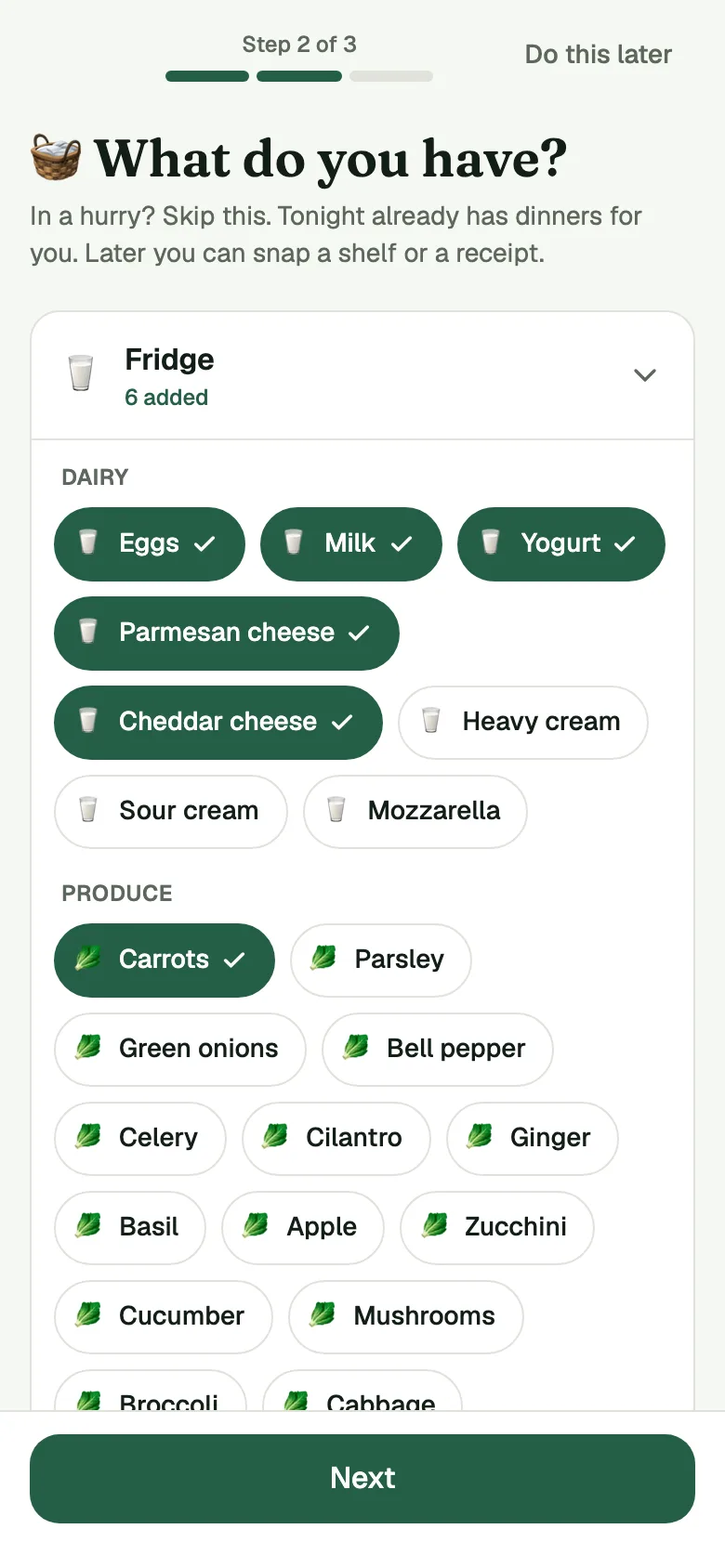
When you set up your kitchen, the app asks "What do you have?" Open the Fridge, the Freezer and the Pantry and tap the foods you see. It takes a couple of minutes, and you can start with a few things. Your pantry tracker then keeps each food marked have, low or out. Tap Used as you use something up: the first tap makes it Running low, the next makes it All gone.
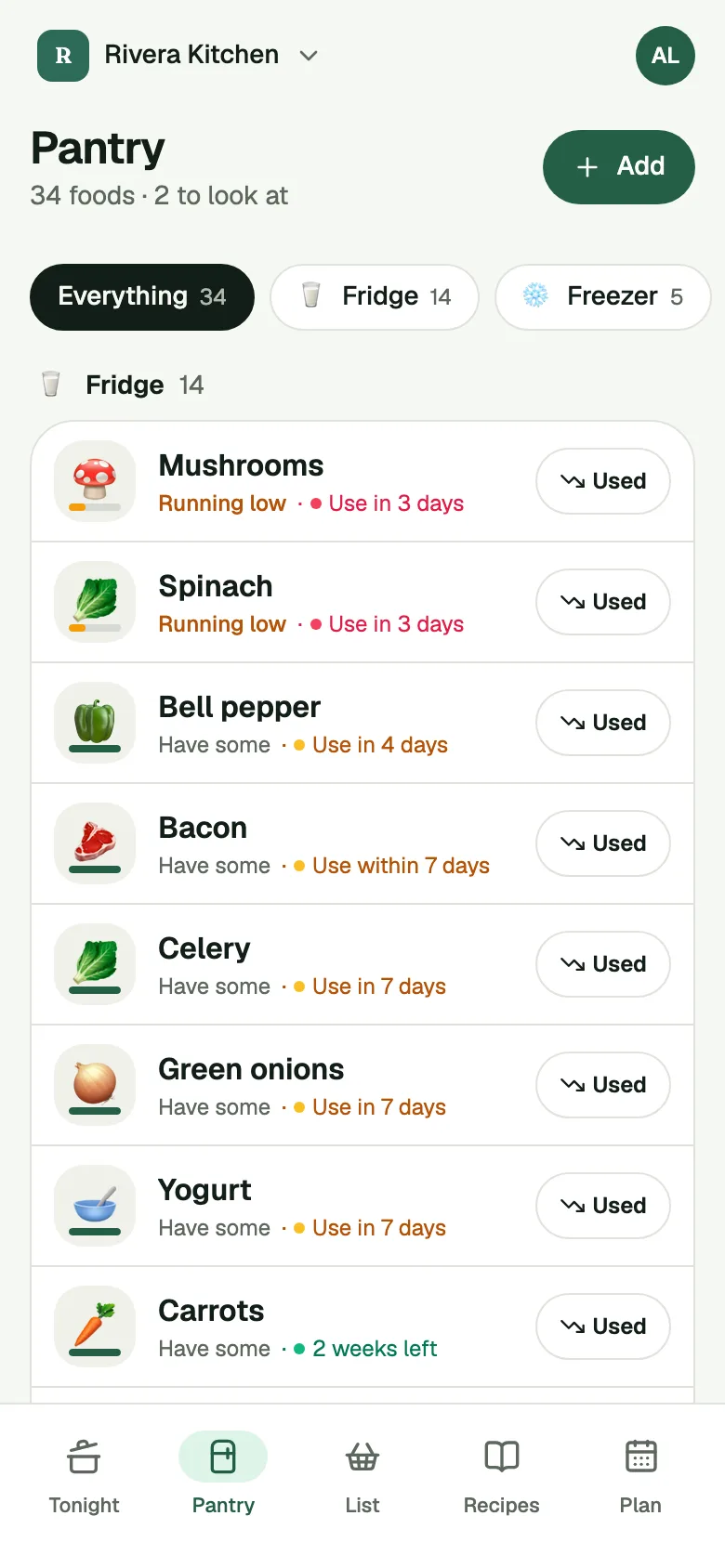
The Pantry screen has tabs for Everything and each spot: the Fridge, the Freezer and the Pantry, and you can add your own spots, like a garage freezer, in Settings under Storage. Move a food to another spot and the app gives it a date that fits that spot. See Pantry dates.
Step 5: The one habit that keeps it organized
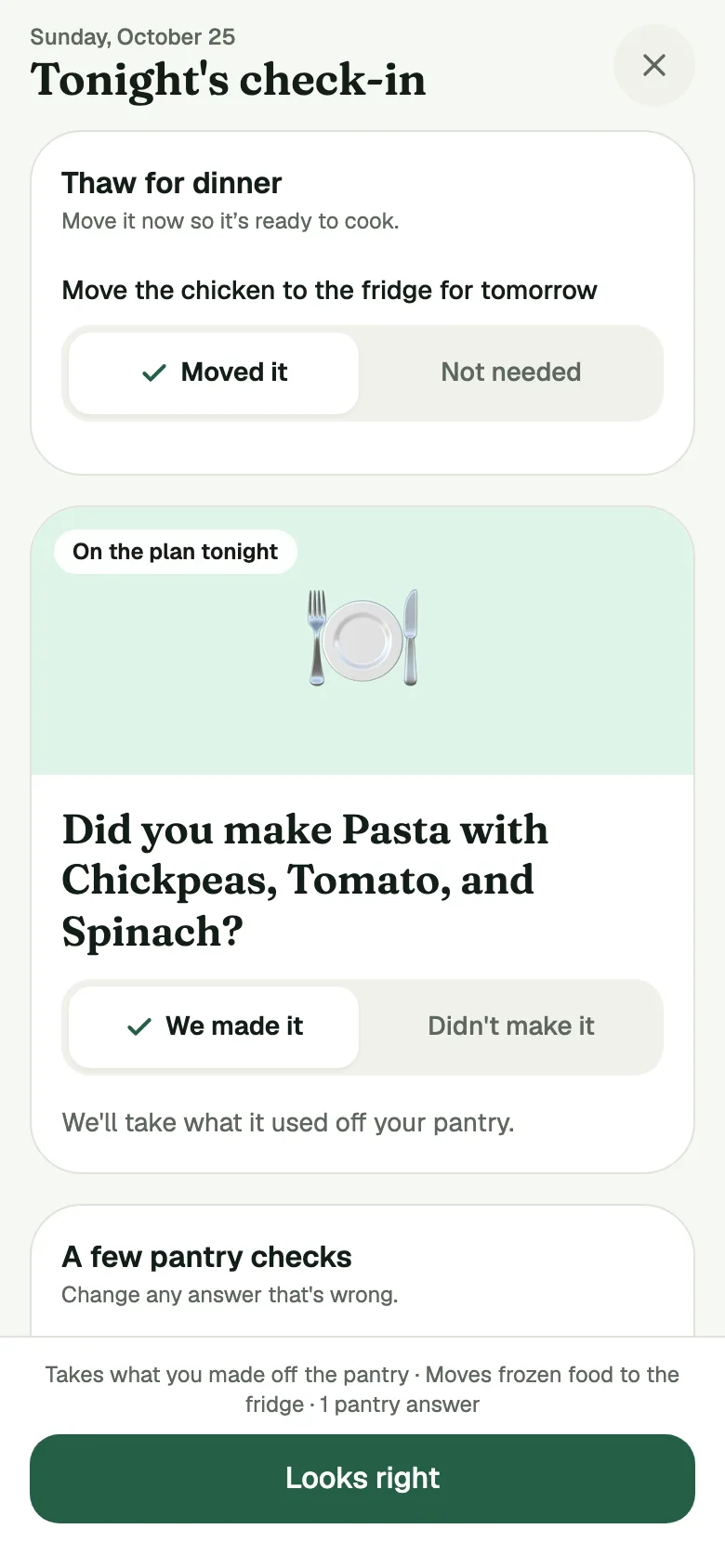
Once a day, the app asks a few quick questions. This is the Check-in. Each answer is already set to the app's best guess, so most days you tap Looks right once and you're done. It might ask "Still have rice?" or tell you the spinach expires tomorrow. See how it works in The daily Check-in.
That one tap is what keeps the list honest. After a shop, Put Away moves what you bought into the right spot, so the pantry in the app and the pantry on your shelf stay the same pantry.
Use first
At the top of the Pantry, Use first lists foods whose date is within 3 days or past. When a food is close to its date, cook it or freeze it before you buy more. The dates are estimates, and a date passing means check the food first. When in doubt, throw it out. Check the label and the date.
A five-minute reset
If your pantry is already a mess, don't wait for a free afternoon.
- Take one shelf out today and sort it into zones.
- Put the food back where you'll reach for it.
- Tap through the Pantry in the app and mark what's low.
- Do the next shelf tomorrow.
Next week, the Check-in does most of the remembering for you.