
How to keep a pantry inventory
Last checked
Split your kitchen into three zones, mark each food as have, low or out, and go through it once a week. Skip anything you buy and use up in a few days. That is a pantry inventory you can keep.
Most inventories die for the same reason: they ask for too much. A spreadsheet with quantities, brands and prices is fun for a weekend and a chore by Wednesday. The method below asks for less, so it lasts.
Start with three zones
Walk to the fridge, the freezer and the pantry shelves, and write down what lives in each. A zone is just where the food is kept. Three is enough for most kitchens.
If you have a second spot, like a garage freezer or a basement shelf, give it its own zone. Keeping it separate means you never wonder whether the frozen bread is upstairs or down.
Do not try to be complete on day one. Write down the foods you cook with most. You can add the rest as you meet it. A list of 40 foods you trust beats a list of 200 you stopped reading.
If you want a head start, the printable at the end of this guide lists 40 common foods by shelf, with a box to tick for each.
Mark have, low or out
For each food, you only need three states.
- Have: there is plenty.
- Low: there is one meal's worth or less, so it belongs on your next shopping list.
- Out: there is none, so it goes on the list now.
Skip exact quantities for foods you do not count. "Rice: have" is more useful than "Rice: 1.4 kg", because you will actually update it. Count only the foods where the number changes what you do, like eggs or cans of tomatoes.
Do one pass a week
Pick a regular moment. Right before you write the shopping list works well, because the list is the reason you are looking.
Go zone by zone. For each food, ask one question: is this still right? Change what is not. Add what you bought. Cross off what is gone. Five minutes is plenty.
While you are there, look at the dates. The FDA says to keep your fridge at 40 °F or below and your freezer at 0 °F, and recommends a cheap appliance thermometer in each to check. It also says that food past its use by date should be thrown out.
When in doubt, throw it out. Check the label and the date.
Source: FDA, Refrigerator Thermometers: Cold Facts about Food Safety, fetched 2026-10-26.
What to leave off
An inventory is a tool, not a record of everything you own. Leave these off.
- Foods you buy and finish within a few days. Fresh bread and a bag of salad do not need a row.
- Things you never run out of. Salt, pepper and cooking oil can sit under "always on hand" and stay there.
- Brands, sizes and prices. None of them change what you cook tonight.
- Anything you would not miss. If running out would not change dinner, it does not need a row.
Why it slips, and what fixes it
The weekly pass is the weak point. It depends on you remembering to do it, and on the Sunday you skip, the list drifts. Two weeks later you do not trust it, so you stop looking at it.
The fix is to make the pass smaller and more often, not bigger. A few questions a day, each with an answer already filled in, takes seconds and never builds up into a chore.
How the Check-in does the pass for you
Pantry Assistant works that way. You set up once: in Setup, a screen called What do you have? shows Fridge, Freezer and Pantry as sections, and you tap the foods you have. After that, the pantry keeps itself current in small steps.
Once a day, the Check-in asks a few questions about what changed. "Still have milk?" "Did you make the dinner you planned?" Every answer starts with the app's best guess, so most days you tap Looks right once and you are done. You can change any answer first, and you can undo it right after.
The Check-in covers the same three states from this guide. On the Pantry, each food is have, low or out: tap Used as you use it up, and the first tap makes it Running low and the next makes it All gone. Foods that ran out come up in the Check-in, where you choose whether they go on the list. Nothing goes on your shopping list unless you tap Add to the list.
After a shop, Put Away moves what you bought from your shopping list into the pantry, so the weekly shop does not leave the inventory behind.
The app also estimates when food should be used, from storage guidance, and shows an "about" next to estimated dates. It is a guide: check the food yourself, and the label wins.
Is it worth doing at all?
Yes, if you ever stand at the fridge at five o'clock trying to remember what is in there. A current inventory answers that in seconds and tells you what to buy, so you do not come home with a third jar of paprika.
It is not worth doing if you need it to be perfect. A list that is mostly right and easy to fix is the goal.
Download the pantry starter list
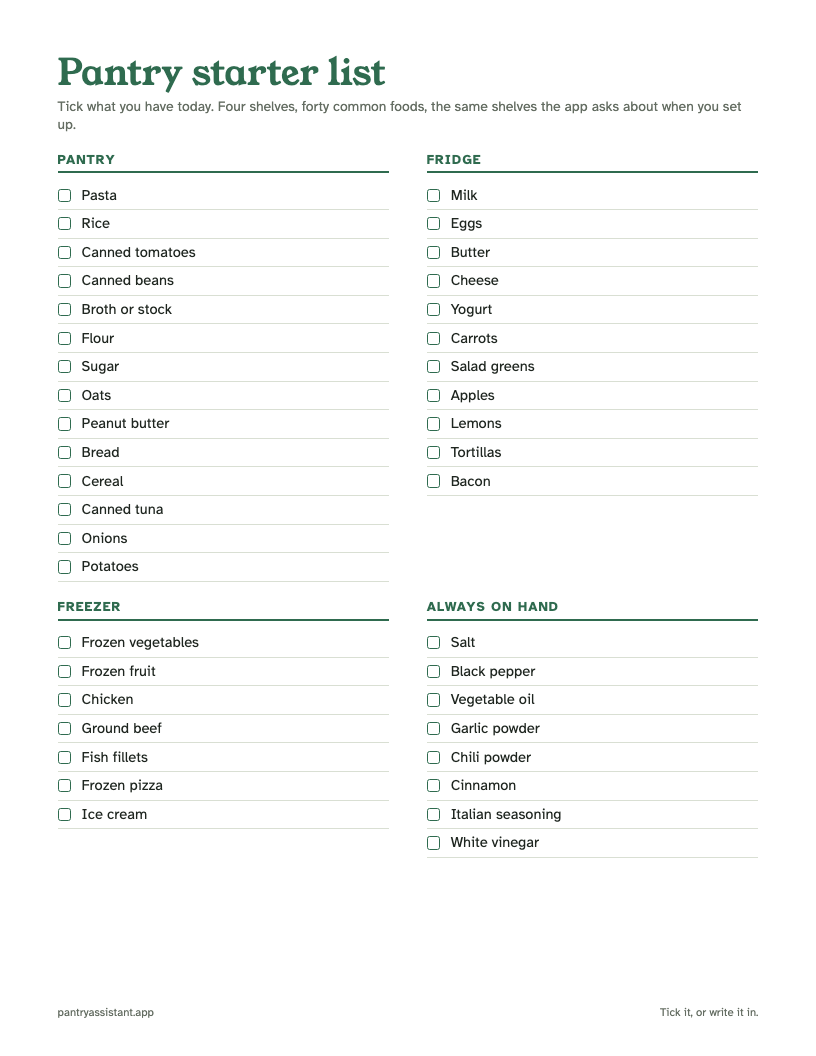
A one-page checklist of 40 common foods, grouped the way Setup groups them: Pantry, Fridge, Freezer and Always on hand.
- Tick what you have today, and write in what is missing.
- Use it to set up a new kitchen, or to reset an old one.
- Print it once, then keep the ticked copy next to your shopping list.
Download the pantry starter list (PDF)
Is it free? Yes. What format? A PDF that prints on one page.
For the step by step of the Check-in, see the Help article below.